Amcrest Fisheye IP POE Camera, 360° Panoramic – Features & Prices in Saudi Arabia :
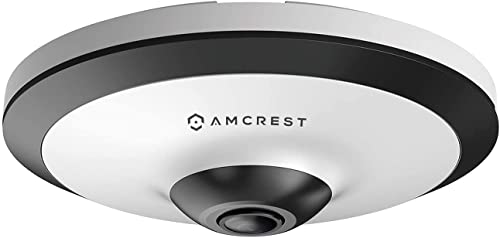
Amcrest Fisheye IP POE Camera, 360° Panoramic 5-Megapixel POE IP Camera, Fish Eye Security Indoor Camera, 33ft Nightvision, IVS Features and People Counting, MicroSD Recording, IP5M-F1180EW-V2 (White)
Product Dimensions
4.9 x 4.9 x 1.8 inches
Item Weight
14.4 ounces
ASIN
B07YNVJDJH
Item model number
IP5M-F1180EW-V2
Date First Available
October 3, 2019
Manufacturer
Amcrest
Test video – Amcrest Fisheye IP POE Camera, 360° Panoramic :
Product highlights :
This Fisheye AI PoE Camera features deep IVS: Tripwire & Intrusion. Supports People Counting in area, and displaying and outputting yearly/monthly/daily reports (Smart NVR Required, ASIN:B08CJJC9HN, B08CJMRQPY) support people counting in 4 areas. Intelligent Search, event extraction and merging to event videos (Smart NVR Required; Not Included). Offers 5MP @30fps video with a super-wide 360° panoramic view. A PoE injector or switch is required; not included.
EXPERIENCE ULTRA HD – Observe high-quality footage with the latest progressive scanning Starvis image sensor, chipset and UltraHD 5MP resolution (2592×1944). Features a 1.4mm fish-eye lens. A wide 360° panoramic view allows you to see more detail and cover more ground to keep more of what you love safe. Power Over Ethernet (PoE Camera) for easy installation (PoE injector or switch required; not included, sold separately). This is a FIXED panoramic IP camera and Does Not Pan/Tilt.
SMARTER, SAFER SECURITY – Utilize intelligent alerts that send notifications to your computer or smartphone via the Amcrest View app. Record events as soon as they happen and store them on an Amcrest NVR, MicroSD (up to 128GB), QNAP, NAS, FTP, Blue Iris or Amcrest Cloud. The fisheye security camera has dual H.265/H.264 compression allows for maximum encryption with the latest technology as well as backward compatibility with legacy platforms. Compatible with AM-HAP201 (B07KTBZGC3)
PANORAMIC CAMERA – The Amcrest Panoramic IP camera has a super-wide 180° viewing angle and an outstanding panoramic field of 360°. This fish-eye camera comes with a built-in microphone, and it also includes RCA connections for two-way audio, speaker not included and sold separately. Compatible Mounting Brackets are AMCPFB203W (ASIN:B071L2RDK2, B07FK83Z4Z) & AMCPFA152-E (ASIN:B07195BN8X)
FIND SOLACE IN THE CLOUD – Amcrest Cloud was created to ensure that you don’t miss a thing, no matter where you are. With an intuitive interface, you are able to live-stream your footage which enables you to play it back based on your preferences.
➕ What is the price of Amcrest Fisheye IP POE Camera, 360° Panoramic in Saudi Arabia ?
The price of Amcrest Fisheye IP POE Camera, 360° Panoramic in-store is 800 SAR VAT.
➕ When Amcrest Fisheye IP POE Camera, 360° Panoramic was released ?
The release date was October 3, 2019.
➕ What is the price of Amcrest Fisheye IP POE Camera, 360° Panoramic cheap used ?
The price of Amcrest Fisheye IP POE Camera, 360° Panoramic used is 560 SAR VAT.
➕ What are the main characteristics of Amcrest Fisheye IP POE Camera, 360° Panoramic ?
Special specifications :
This Fisheye AI PoE Camera features deep IVS: Tripwire & Intrusion. Supports People Counting in area, and displaying and outputting yearly/monthly/daily reports (Smart NVR Required, ASIN:B08CJJC9HN, B08CJMRQPY) support people counting in 4 areas. Intelligent Search, event extraction and merging to event videos (Smart NVR Required; Not Included). Offers 5MP @30fps video with a super-wide 360° panoramic view. A PoE injector or switch is required; not included.
➕ Is it interesting to buy this product ?
The best people who can answer you are customers who have already bought and tested this product (See Customer Reviews). This product is rated 4.4 / 5 on Amazon.
➕ Where to buy Amcrest Fisheye IP POE Camera, 360° Panoramic in Saudi Arabia ?
Portable, Night Vision, Image Sensor, Motion Sensor
Indoor/Outdoor Usage
Indoor
Purchase advice :
Warranty :
Check the duration of the warranty and also the faults and defects it covers. Is it complete or limited? and What is included in the warranty (parts, repairs or both)?
Shipping :
Is delivery offered? And how long does it take to get delivered (Delivery time)
Proof of purchase :
Does the shop give you an invoice ?
After-sales service :
Do they have an after-sales service to have information about the installation or operation (instructions for use). Also in case of problem, it is the seller who takes charge or you must contact the manufacturer or supplier yourself.
_____________________________
3 reviews for Amcrest Fisheye IP POE Camera, 360° Panoramic
Rated 4 out of 5
T. D (verified owner)–
Good – Covered a room that would’ve normally needed 3-4 cameras to cover all of the angles I wanted.
Rated 5 out of 5
P. T (verified owner)–
Finally, a POE Outdoor/Indoor Fisheye camera from Amcrest – I will confess to having extension cords running through my attic to power two D-Link fisheye cameras outdoors (although not weatherproof). After eight years I have now removed those extension cords and replaced the cameras with the Amcrest POE OUTDOOR Fisheye cameras.
Rated 4 out of 5
B. E (verified owner)–
Great Garage Camera Option! – So the Fisheye camera experience is pretty interesting if you never bought/used one before. Typically I’ve bought PTZ cameras for indoor and Bullet/Dome camera’s for outside, but was always interested in trying the fisheye style cause I can see the benefit of flush mounting something to the ceiling for looks. So initially I’d thought about installing this outside in our front door area. It has a high ceiling and would be a great option to catch porch thieves, but note that this camera is indoor only and wouldn’t due well in super cold weather. The inside of our house is pretty well covered with other camera’s with the exception of the garage so I opted to install it there. We have Amazon Prime delivering to our garage via Key delivery pretty frequently, plus we have our door open often in summer so it just made sense. So in terms of installation, for me it was kind of a pain honestly. I’m used to installing camera’s outside that usually have some beefier hardware, but in fact this camera affixes to the ceiling or wall with a plastic bracket that has a tab to lock the camera into place. So initially I thought I’d install it onto a junction box but the camera/bracket are designed to where the ethernet cord will come out on the side so long story short I ended up running the cords to the box and keeping them in there. Not my favorite install, but made it work. So in terms of setup and install it was super easy like all my other camera’s with the Android app and connecting it via P2P. Probably the biggest feature of the Android app is that it does have the fisheye de-warp setting that allows you to look around the room like a traditional PTZ camera really. I also connected the camera to an Amcrest NVR the NVR4108-HS. As some others have noted though, the NVR does not offer the de-warp feature on playback so some will find that a drawback. Another potential drawback for some is that this camera’s firmware has not been updated yet like other Amcrest camera’s to where you can directly access this via its IP address. I did have to still access the camera thru the older Plugin in the Chrome store. In checking the website for firmware updates, there has not been any offered so thats a little disappointing to see that its not receiving updates for its price point. But, once you do access the camera its does offer a surprising amount of options. Namely, you can configure the camera for top-down installation or on the wall installation and utilize the de-warp feature live, similar to the mobile app. It also has a number of other views you use as I show in one of my pictures so kudos there. I did encounter some glitches/bugs in the software as I was trying to change views so again it would be nice to see some firmware updates that could help address some of those issues. All in all I’m happy with the camera though. I really like I can have one camera in the garage that captures all 3 bays, has audio, if someone is in the garage I can talk to them, and I do like the ceiling mount/flush look even though it was a slight pain on install. Definitely in a retail/commercial setting I can see the appeal of using this style of camera.
Rated 5 out of 5
P. T (verified owner)–
Finally, a POE Outdoor/Indoor Fisheye camera from Amcrest – I will confess to having extension cords running through my attic to power two D-Link fisheye cameras outdoors (although not weatherproof). After eight years I have now removed those extension cords and replaced the cameras with the Amcrest POE OUTDOOR Fisheye cameras.
Rated 4 out of 5
B. E (verified owner)–
Great Garage Camera Option! – So the Fisheye camera experience is pretty interesting if you never bought/used one before. Typically I’ve bought PTZ cameras for indoor and Bullet/Dome camera’s for outside, but was always interested in trying the fisheye style cause I can see the benefit of flush mounting something to the ceiling for looks. So initially I’d thought about installing this outside in our front door area. It has a high ceiling and would be a great option to catch porch thieves, but note that this camera is indoor only and wouldn’t due well in super cold weather. The inside of our house is pretty well covered with other camera’s with the exception of the garage so I opted to install it there. We have Amazon Prime delivering to our garage via Key delivery pretty frequently, plus we have our door open often in summer so it just made sense. So in terms of installation, for me it was kind of a pain honestly. I’m used to installing camera’s outside that usually have some beefier hardware, but in fact this camera affixes to the ceiling or wall with a plastic bracket that has a tab to lock the camera into place. So initially I thought I’d install it onto a junction box but the camera/bracket are designed to where the ethernet cord will come out on the side so long story short I ended up running the cords to the box and keeping them in there. Not my favorite install, but made it work. So in terms of setup and install it was super easy like all my other camera’s with the Android app and connecting it via P2P. Probably the biggest feature of the Android app is that it does have the fisheye de-warp setting that allows you to look around the room like a traditional PTZ camera really. I also connected the camera to an Amcrest NVR the NVR4108-HS. As some others have noted though, the NVR does not offer the de-warp feature on playback so some will find that a drawback. Another potential drawback for some is that this camera’s firmware has not been updated yet like other Amcrest camera’s to where you can directly access this via its IP address. I did have to still access the camera thru the older Plugin in the Chrome store. In checking the website for firmware updates, there has not been any offered so thats a little disappointing to see that its not receiving updates for its price point. But, once you do access the camera its does offer a surprising amount of options. Namely, you can configure the camera for top-down installation or on the wall installation and utilize the de-warp feature live, similar to the mobile app. It also has a number of other views you use as I show in one of my pictures so kudos there. I did encounter some glitches/bugs in the software as I was trying to change views so again it would be nice to see some firmware updates that could help address some of those issues. All in all I’m happy with the camera though. I really like I can have one camera in the garage that captures all 3 bays, has audio, if someone is in the garage I can talk to them, and I do like the ceiling mount/flush look even though it was a slight pain on install. Definitely in a retail/commercial setting I can see the appeal of using this style of camera.
Rated 4 out of 5
T. D (verified owner)–
Good – Covered a room that would’ve normally needed 3-4 cameras to cover all of the angles I wanted.


T. D (verified owner) –
Good – Covered a room that would’ve normally needed 3-4 cameras to cover all of the angles I wanted.
P. T (verified owner) –
Finally, a POE Outdoor/Indoor Fisheye camera from Amcrest – I will confess to having extension cords running through my attic to power two D-Link fisheye cameras outdoors (although not weatherproof). After eight years I have now removed those extension cords and replaced the cameras with the Amcrest POE OUTDOOR Fisheye cameras.
B. E (verified owner) –
Great Garage Camera Option! – So the Fisheye camera experience is pretty interesting if you never bought/used one before. Typically I’ve bought PTZ cameras for indoor and Bullet/Dome camera’s for outside, but was always interested in trying the fisheye style cause I can see the benefit of flush mounting something to the ceiling for looks. So initially I’d thought about installing this outside in our front door area. It has a high ceiling and would be a great option to catch porch thieves, but note that this camera is indoor only and wouldn’t due well in super cold weather. The inside of our house is pretty well covered with other camera’s with the exception of the garage so I opted to install it there. We have Amazon Prime delivering to our garage via Key delivery pretty frequently, plus we have our door open often in summer so it just made sense. So in terms of installation, for me it was kind of a pain honestly. I’m used to installing camera’s outside that usually have some beefier hardware, but in fact this camera affixes to the ceiling or wall with a plastic bracket that has a tab to lock the camera into place. So initially I thought I’d install it onto a junction box but the camera/bracket are designed to where the ethernet cord will come out on the side so long story short I ended up running the cords to the box and keeping them in there. Not my favorite install, but made it work. So in terms of setup and install it was super easy like all my other camera’s with the Android app and connecting it via P2P. Probably the biggest feature of the Android app is that it does have the fisheye de-warp setting that allows you to look around the room like a traditional PTZ camera really. I also connected the camera to an Amcrest NVR the NVR4108-HS. As some others have noted though, the NVR does not offer the de-warp feature on playback so some will find that a drawback. Another potential drawback for some is that this camera’s firmware has not been updated yet like other Amcrest camera’s to where you can directly access this via its IP address. I did have to still access the camera thru the older Plugin in the Chrome store. In checking the website for firmware updates, there has not been any offered so thats a little disappointing to see that its not receiving updates for its price point. But, once you do access the camera its does offer a surprising amount of options. Namely, you can configure the camera for top-down installation or on the wall installation and utilize the de-warp feature live, similar to the mobile app. It also has a number of other views you use as I show in one of my pictures so kudos there. I did encounter some glitches/bugs in the software as I was trying to change views so again it would be nice to see some firmware updates that could help address some of those issues. All in all I’m happy with the camera though. I really like I can have one camera in the garage that captures all 3 bays, has audio, if someone is in the garage I can talk to them, and I do like the ceiling mount/flush look even though it was a slight pain on install. Definitely in a retail/commercial setting I can see the appeal of using this style of camera.
P. T (verified owner) –
Finally, a POE Outdoor/Indoor Fisheye camera from Amcrest – I will confess to having extension cords running through my attic to power two D-Link fisheye cameras outdoors (although not weatherproof). After eight years I have now removed those extension cords and replaced the cameras with the Amcrest POE OUTDOOR Fisheye cameras.
B. E (verified owner) –
Great Garage Camera Option! – So the Fisheye camera experience is pretty interesting if you never bought/used one before. Typically I’ve bought PTZ cameras for indoor and Bullet/Dome camera’s for outside, but was always interested in trying the fisheye style cause I can see the benefit of flush mounting something to the ceiling for looks. So initially I’d thought about installing this outside in our front door area. It has a high ceiling and would be a great option to catch porch thieves, but note that this camera is indoor only and wouldn’t due well in super cold weather. The inside of our house is pretty well covered with other camera’s with the exception of the garage so I opted to install it there. We have Amazon Prime delivering to our garage via Key delivery pretty frequently, plus we have our door open often in summer so it just made sense. So in terms of installation, for me it was kind of a pain honestly. I’m used to installing camera’s outside that usually have some beefier hardware, but in fact this camera affixes to the ceiling or wall with a plastic bracket that has a tab to lock the camera into place. So initially I thought I’d install it onto a junction box but the camera/bracket are designed to where the ethernet cord will come out on the side so long story short I ended up running the cords to the box and keeping them in there. Not my favorite install, but made it work. So in terms of setup and install it was super easy like all my other camera’s with the Android app and connecting it via P2P. Probably the biggest feature of the Android app is that it does have the fisheye de-warp setting that allows you to look around the room like a traditional PTZ camera really. I also connected the camera to an Amcrest NVR the NVR4108-HS. As some others have noted though, the NVR does not offer the de-warp feature on playback so some will find that a drawback. Another potential drawback for some is that this camera’s firmware has not been updated yet like other Amcrest camera’s to where you can directly access this via its IP address. I did have to still access the camera thru the older Plugin in the Chrome store. In checking the website for firmware updates, there has not been any offered so thats a little disappointing to see that its not receiving updates for its price point. But, once you do access the camera its does offer a surprising amount of options. Namely, you can configure the camera for top-down installation or on the wall installation and utilize the de-warp feature live, similar to the mobile app. It also has a number of other views you use as I show in one of my pictures so kudos there. I did encounter some glitches/bugs in the software as I was trying to change views so again it would be nice to see some firmware updates that could help address some of those issues. All in all I’m happy with the camera though. I really like I can have one camera in the garage that captures all 3 bays, has audio, if someone is in the garage I can talk to them, and I do like the ceiling mount/flush look even though it was a slight pain on install. Definitely in a retail/commercial setting I can see the appeal of using this style of camera.
T. D (verified owner) –
Good – Covered a room that would’ve normally needed 3-4 cameras to cover all of the angles I wanted.