Jennov 3MP/2K Light Bulb Security Camera Wireless – Features & Prices in Saudi Arabia :
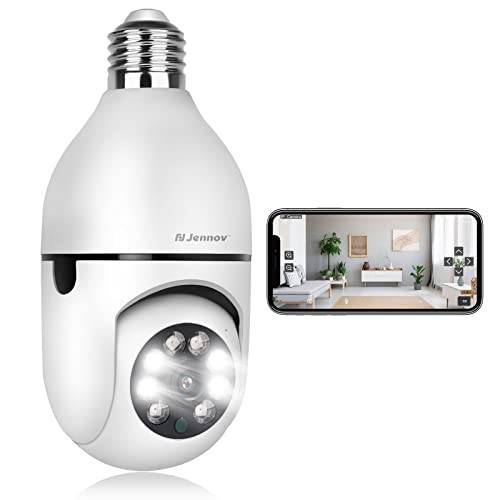
Jennov 3MP/2K Light Bulb Security Camera Wireless Outdoor, 2.4GHz Light Socket Security Camera, 360° Indoor WiFi Home Lightbulb Surveillance Camera Motion Detection, Color Night Vision, Two Way Talk
Product Dimensions
6.7 x 3.27 x 3.19 inches
Item Weight
9.1 ounces
ASIN
B0B98WTPJJ
Item model number
Light Bulb Security Camera
Date First Available
August 10, 2022
Manufacturer
Shenzhen Dianchen Industrial Co.,Ltd
Test video – Jennov 3MP/2K Light Bulb Security Camera Wireless :
Product highlights :
【3MP】【2K】【UPDATE CHIPS】Jennov internet engineers spend 2 years UPGRADE THE CHIPSET of this light bulb security camera to make it easier to wireless pair and easier to install. 3MP/2K UHD PICTURES QUALITY to make it more clear than 1080p security cameras both the day vision and night vision. We also only support 2.4GHz wifi, Our wireless signal department test the 2.4Ghz wifi is more stable and owns a longer transmission distance to solve offline problems(NOT SUPPORT 5GHz DUAL FREQUENCY ROUTER)
【COMPATIBLE with OUTDOOR LIGHT FIXTURES】- Universal E27 Socket. You can use the Light bulb camera wifi outdoor instead of the outdoor wall lantern. Solve the problem that traditional outdoor security cameras need to pull in the outside wire. Replacement is extremely simple without any tools. Pan-Tilt IP smart security camera keeps an eye on your porch to look after the kids/dogs /Older at 360-wide angles. Use an sd card or Cloud storageto recording and playback (SD CARD IS NOT INCLUDED)
【Two-Way and Remote Access】- Light bulb security camera wireless outdoor built in high-quality Mic and speaker, this bulb camera for home security allow you to use the Two Way Audio function to talk with your family in front of the camera. You can also share the camera screen with your family to watch what happened at any time. Search “Ajcloud” on the apple store or google play to download “AJCloud” APP. View the video remotely anytime and anywhere by your smartphone ios or android via the App
【Motion Detection & Sound and Light Alarm】- This wifi lightbulb camera has a motion detection function. When an intruder is detected, it can send out a sound and light alarm, and it will push the notification in real time. You don’t have to worry about missing any moment when you go out, making your home safer.
【Color Night Vision & COMPATIBLE with ALEXA】-Camera bulb even in complete darkness, you can view clear images. Quality 4pcs infrared LEDs & 4pcs Yellow floodlight leds Sensor extend the range of night vision reach up to 33 ft, lets you see everything clearly even in the dark, and the lights turn on automatically when you are coming.(You can turn on or off the light on the APP according to your need). COMPATIBLE with ALEXA,you can more easier to on/off it as a smart camera.
➕ What is the price of Jennov 3MP/2K Light Bulb Security Camera Wireless in Saudi Arabia ?
The price of Jennov 3MP/2K Light Bulb Security Camera Wireless in-store is 90 SAR VAT.
➕ When Jennov 3MP/2K Light Bulb Security Camera Wireless was released ?
The release date was August 10, 2022.
➕ What is the price of Jennov 3MP/2K Light Bulb Security Camera Wireless cheap used ?
The price of Jennov 3MP/2K Light Bulb Security Camera Wireless used is 60 SAR VAT.
➕ What are the main characteristics of Jennov 3MP/2K Light Bulb Security Camera Wireless ?
Special specifications :
【3MP】【2K】【UPDATE CHIPS】Jennov internet engineers spend 2 years UPGRADE THE CHIPSET of this light bulb security camera to make it easier to wireless pair and easier to install. 3MP/2K UHD PICTURES QUALITY to make it more clear than 1080p security cameras both the day vision and night vision. We also only support 2.4GHz wifi, Our wireless signal department test the 2.4Ghz wifi is more stable and owns a longer transmission distance to solve offline problems(NOT SUPPORT 5GHz DUAL FREQUENCY ROUTER)
➕ Is it interesting to buy this product ?
The best people who can answer you are customers who have already bought and tested this product (See Customer Reviews). This product is rated 4.1 / 5 on Amazon.
➕ Where to buy Jennov 3MP/2K Light Bulb Security Camera Wireless in Saudi Arabia ?
3MP UHD Resolution, Built In Light, Work with Alexa, Motion Sensor
Purchase advice :
Warranty :
Check the duration of the warranty and also the faults and defects it covers. Is it complete or limited? and What is included in the warranty (parts, repairs or both)?
Shipping :
Is delivery offered? And how long does it take to get delivered (Delivery time)
Proof of purchase :
Does the shop give you an invoice ?
After-sales service :
Do they have an after-sales service to have information about the installation or operation (instructions for use). Also in case of problem, it is the seller who takes charge or you must contact the manufacturer or supplier yourself.
_____________________________
16 reviews for Jennov 3MP/2K Light Bulb Security Camera Wireless
Rated 5 out of 5
G. G (verified owner)–
Quality vision & great features! – We really enjoy this camera. It was installed in the main entrance. Very easy to install as it just twists as a light bulb! We have it set up where it turns on and off by timer settings and high sensitivity. Sensitivity can be modified. The light comes on every time it senses movement without delay. The light is bright.
Rated 4 out of 5
G. D (verified owner)–
Good Bulb Camera for the price – Good bulb camera for the price. Good color night vision. Easy set-up
Rated 5 out of 5
M. T (verified owner)–
Very easy to set up and excellent display quality – I bought 5 of these bulb cameras for my winter house and when I go back to my summer house I will buy another 5. They are so easy to set up and for the price, I was amazed of the display quality. A trick, I disable my wi-fi 5G during I configured the cameras to make sure my Cell phone was using Wi-fi 2.4G. After setup, I set back my 5G. The cameras use 2.4G but once configured, your phone can view the camera live on both wifi speed. In two rooms I didn’t have a bulb lamp, so I bought on Amazon an adapter that goes from “wall outlet” to “light socket “ and it worked great. When we are home, I just need to unscrew the bulb camera and put back the bulb light in. Quick and easy… I recommend this bulb camera.
Rated 4 out of 5
K. J (verified owner)–
this camera works with blue iris, easy to setup with wireless as well – The most important thing I was looking for was a camera that would be compatible with Blue Iris. This camera works fine with it. The camera is also very easy to setup with wireless. The picture quality is also very good for an inexpensive camera. I have another Jennov camera that I have had for 4 years and it is still working. Most security cameras in these price ranges do not last for 4 years. I hope this little camera will work for many years.
Rated 4 out of 5
G. D (verified owner)–
Good Bulb Camera for the price – Good bulb camera for the price. Good color night vision. Easy set-up
Rated 5 out of 5
A. M (verified owner)–
Great multi function camera! – My security bulb camera came fast by Prime. I downloaded the app, screwed the camera into my front porch light socket, then scanned the QR code from my phone in front of the camera lens. The camera said the code was accepted, and Presto! I could now see in front of my house! It was that easy to setup. I can now make any adjustments through the app. It does everything that I expected it to do. There is a slight 2 second delay when positioning the camera to where you want it. It is a great quality camera that is very affordable and multi functional. Make sure that you don’t scan the first QR code like I did, it won’t work. I think it was the 4th one on the app that worked on this model. You will be happy that you bought this!!! Thank you for a great quality security camera!!!
Rated 5 out of 5
G. G (verified owner)–
Quality vision & great features! – We really enjoy this camera. It was installed in the main entrance. Very easy to install as it just twists as a light bulb! We have it set up where it turns on and off by timer settings and high sensitivity. Sensitivity can be modified. The light comes on every time it senses movement without delay. The light is bright.
Rated 4 out of 5
K. J (verified owner)–
this camera works with blue iris, easy to setup with wireless as well – The most important thing I was looking for was a camera that would be compatible with Blue Iris. This camera works fine with it. The camera is also very easy to setup with wireless. The picture quality is also very good for an inexpensive camera. I have another Jennov camera that I have had for 4 years and it is still working. Most security cameras in these price ranges do not last for 4 years. I hope this little camera will work for many years.
Rated 4 out of 5
H. F (verified owner)–
Front door Camera – The longer the image is left on the longer the delay gets. Not sure if it’s the processer or the internet but the data stream definitely slows down over time. Seems to work best with apple. Great for short views on android phones or for motion detection views. Not the best for windows, limited functionality.
Rated 5 out of 5
A. M (verified owner)–
Great multi function camera! – My security bulb camera came fast by Prime. I downloaded the app, screwed the camera into my front porch light socket, then scanned the QR code from my phone in front of the camera lens. The camera said the code was accepted, and Presto! I could now see in front of my house! It was that easy to setup. I can now make any adjustments through the app. It does everything that I expected it to do. There is a slight 2 second delay when positioning the camera to where you want it. It is a great quality camera that is very affordable and multi functional. Make sure that you don’t scan the first QR code like I did, it won’t work. I think it was the 4th one on the app that worked on this model. You will be happy that you bought this!!! Thank you for a great quality security camera!!!
Rated 4 out of 5
O. L (verified owner)–
Seems ok but not with Blue Iris? EDIT: Got it working, sorta. Added a star – Edit: I received an email directly from Jennov tech support with a short little video that covers how to get the camera to work with Blue Iris. Kudos to them for caring so much. The short of it is that you set up the camera with the APP, then change the Discovery/ONVIF port to 8899 from the BI default of 8999. You will also need to add whichever user and password you change to. The find/Inspect feature will then populate the Main Profile1 to /live/ch0?token=blahblahblahblhah of which it appears that only the /live/ch0 is critical. You can also use Sub Profile2 /live/ch1 and get the substream to work which is nice.
Rated 4 out of 5
O. L (verified owner)–
Seems ok but not with Blue Iris? EDIT: Got it working, sorta. Added a star – Edit: I received an email directly from Jennov tech support with a short little video that covers how to get the camera to work with Blue Iris. Kudos to them for caring so much. The short of it is that you set up the camera with the APP, then change the Discovery/ONVIF port to 8899 from the BI default of 8999. You will also need to add whichever user and password you change to. The find/Inspect feature will then populate the Main Profile1 to /live/ch0?token=blahblahblahblhah of which it appears that only the /live/ch0 is critical. You can also use Sub Profile2 /live/ch1 and get the substream to work which is nice.
Rated 5 out of 5
I. G (verified owner)–
Inexpensive, easy to setup Room Monitor – I know that some will see this as an outdoor cam, but we recently have a very active and curious 5 year old in the house and so to keep track of his actions and keep him honest, I installed this camera in the bedroom. It has up to 4 saved positions that you can set, as well as an option to save to cloud of SD/TF care. You can connect to it via an app and view and control it via the app..internet access is q must for remote viewing.
Rated 4 out of 5
H. F (verified owner)–
Front door Camera – The longer the image is left on the longer the delay gets. Not sure if it’s the processer or the internet but the data stream definitely slows down over time. Seems to work best with apple. Great for short views on android phones or for motion detection views. Not the best for windows, limited functionality.
Rated 5 out of 5
I. G (verified owner)–
Inexpensive, easy to setup Room Monitor – I know that some will see this as an outdoor cam, but we recently have a very active and curious 5 year old in the house and so to keep track of his actions and keep him honest, I installed this camera in the bedroom. It has up to 4 saved positions that you can set, as well as an option to save to cloud of SD/TF care. You can connect to it via an app and view and control it via the app..internet access is q must for remote viewing.
Rated 5 out of 5
M. T (verified owner)–
Very easy to set up and excellent display quality – I bought 5 of these bulb cameras for my winter house and when I go back to my summer house I will buy another 5. They are so easy to set up and for the price, I was amazed of the display quality. A trick, I disable my wi-fi 5G during I configured the cameras to make sure my Cell phone was using Wi-fi 2.4G. After setup, I set back my 5G. The cameras use 2.4G but once configured, your phone can view the camera live on both wifi speed. In two rooms I didn’t have a bulb lamp, so I bought on Amazon an adapter that goes from “wall outlet” to “light socket “ and it worked great. When we are home, I just need to unscrew the bulb camera and put back the bulb light in. Quick and easy… I recommend this bulb camera.

G. G (verified owner) –
Quality vision & great features! – We really enjoy this camera. It was installed in the main entrance. Very easy to install as it just twists as a light bulb! We have it set up where it turns on and off by timer settings and high sensitivity. Sensitivity can be modified. The light comes on every time it senses movement without delay. The light is bright.
G. D (verified owner) –
Good Bulb Camera for the price – Good bulb camera for the price. Good color night vision. Easy set-up
M. T (verified owner) –
Very easy to set up and excellent display quality – I bought 5 of these bulb cameras for my winter house and when I go back to my summer house I will buy another 5. They are so easy to set up and for the price, I was amazed of the display quality. A trick, I disable my wi-fi 5G during I configured the cameras to make sure my Cell phone was using Wi-fi 2.4G. After setup, I set back my 5G. The cameras use 2.4G but once configured, your phone can view the camera live on both wifi speed. In two rooms I didn’t have a bulb lamp, so I bought on Amazon an adapter that goes from “wall outlet” to “light socket “ and it worked great. When we are home, I just need to unscrew the bulb camera and put back the bulb light in. Quick and easy… I recommend this bulb camera.
K. J (verified owner) –
this camera works with blue iris, easy to setup with wireless as well – The most important thing I was looking for was a camera that would be compatible with Blue Iris. This camera works fine with it. The camera is also very easy to setup with wireless. The picture quality is also very good for an inexpensive camera. I have another Jennov camera that I have had for 4 years and it is still working. Most security cameras in these price ranges do not last for 4 years. I hope this little camera will work for many years.
G. D (verified owner) –
Good Bulb Camera for the price – Good bulb camera for the price. Good color night vision. Easy set-up
A. M (verified owner) –
Great multi function camera! – My security bulb camera came fast by Prime. I downloaded the app, screwed the camera into my front porch light socket, then scanned the QR code from my phone in front of the camera lens. The camera said the code was accepted, and Presto! I could now see in front of my house! It was that easy to setup. I can now make any adjustments through the app. It does everything that I expected it to do. There is a slight 2 second delay when positioning the camera to where you want it. It is a great quality camera that is very affordable and multi functional. Make sure that you don’t scan the first QR code like I did, it won’t work. I think it was the 4th one on the app that worked on this model. You will be happy that you bought this!!! Thank you for a great quality security camera!!!
G. G (verified owner) –
Quality vision & great features! – We really enjoy this camera. It was installed in the main entrance. Very easy to install as it just twists as a light bulb! We have it set up where it turns on and off by timer settings and high sensitivity. Sensitivity can be modified. The light comes on every time it senses movement without delay. The light is bright.
K. J (verified owner) –
this camera works with blue iris, easy to setup with wireless as well – The most important thing I was looking for was a camera that would be compatible with Blue Iris. This camera works fine with it. The camera is also very easy to setup with wireless. The picture quality is also very good for an inexpensive camera. I have another Jennov camera that I have had for 4 years and it is still working. Most security cameras in these price ranges do not last for 4 years. I hope this little camera will work for many years.
H. F (verified owner) –
Front door Camera – The longer the image is left on the longer the delay gets. Not sure if it’s the processer or the internet but the data stream definitely slows down over time. Seems to work best with apple. Great for short views on android phones or for motion detection views. Not the best for windows, limited functionality.
A. M (verified owner) –
Great multi function camera! – My security bulb camera came fast by Prime. I downloaded the app, screwed the camera into my front porch light socket, then scanned the QR code from my phone in front of the camera lens. The camera said the code was accepted, and Presto! I could now see in front of my house! It was that easy to setup. I can now make any adjustments through the app. It does everything that I expected it to do. There is a slight 2 second delay when positioning the camera to where you want it. It is a great quality camera that is very affordable and multi functional. Make sure that you don’t scan the first QR code like I did, it won’t work. I think it was the 4th one on the app that worked on this model. You will be happy that you bought this!!! Thank you for a great quality security camera!!!
O. L (verified owner) –
Seems ok but not with Blue Iris? EDIT: Got it working, sorta. Added a star – Edit: I received an email directly from Jennov tech support with a short little video that covers how to get the camera to work with Blue Iris. Kudos to them for caring so much. The short of it is that you set up the camera with the APP, then change the Discovery/ONVIF port to 8899 from the BI default of 8999. You will also need to add whichever user and password you change to. The find/Inspect feature will then populate the Main Profile1 to /live/ch0?token=blahblahblahblhah of which it appears that only the /live/ch0 is critical. You can also use Sub Profile2 /live/ch1 and get the substream to work which is nice.
O. L (verified owner) –
Seems ok but not with Blue Iris? EDIT: Got it working, sorta. Added a star – Edit: I received an email directly from Jennov tech support with a short little video that covers how to get the camera to work with Blue Iris. Kudos to them for caring so much. The short of it is that you set up the camera with the APP, then change the Discovery/ONVIF port to 8899 from the BI default of 8999. You will also need to add whichever user and password you change to. The find/Inspect feature will then populate the Main Profile1 to /live/ch0?token=blahblahblahblhah of which it appears that only the /live/ch0 is critical. You can also use Sub Profile2 /live/ch1 and get the substream to work which is nice.
I. G (verified owner) –
Inexpensive, easy to setup Room Monitor – I know that some will see this as an outdoor cam, but we recently have a very active and curious 5 year old in the house and so to keep track of his actions and keep him honest, I installed this camera in the bedroom. It has up to 4 saved positions that you can set, as well as an option to save to cloud of SD/TF care. You can connect to it via an app and view and control it via the app..internet access is q must for remote viewing.
H. F (verified owner) –
Front door Camera – The longer the image is left on the longer the delay gets. Not sure if it’s the processer or the internet but the data stream definitely slows down over time. Seems to work best with apple. Great for short views on android phones or for motion detection views. Not the best for windows, limited functionality.
I. G (verified owner) –
Inexpensive, easy to setup Room Monitor – I know that some will see this as an outdoor cam, but we recently have a very active and curious 5 year old in the house and so to keep track of his actions and keep him honest, I installed this camera in the bedroom. It has up to 4 saved positions that you can set, as well as an option to save to cloud of SD/TF care. You can connect to it via an app and view and control it via the app..internet access is q must for remote viewing.
M. T (verified owner) –
Very easy to set up and excellent display quality – I bought 5 of these bulb cameras for my winter house and when I go back to my summer house I will buy another 5. They are so easy to set up and for the price, I was amazed of the display quality. A trick, I disable my wi-fi 5G during I configured the cameras to make sure my Cell phone was using Wi-fi 2.4G. After setup, I set back my 5G. The cameras use 2.4G but once configured, your phone can view the camera live on both wifi speed. In two rooms I didn’t have a bulb lamp, so I bought on Amazon an adapter that goes from “wall outlet” to “light socket “ and it worked great. When we are home, I just need to unscrew the bulb camera and put back the bulb light in. Quick and easy… I recommend this bulb camera.