Video Camera Camcorder Digital YouTube Vlogging Camera is available in Saudi Arabia.
Find out all you need to know about Video Camera Camcorder Digital YouTube Vlogging Camera before buying : Price, Test video, Datasheet, Similar products.
Video Camera Camcorder Digital YouTube Vlogging Camera – Features & Prices in Saudi Arabia :
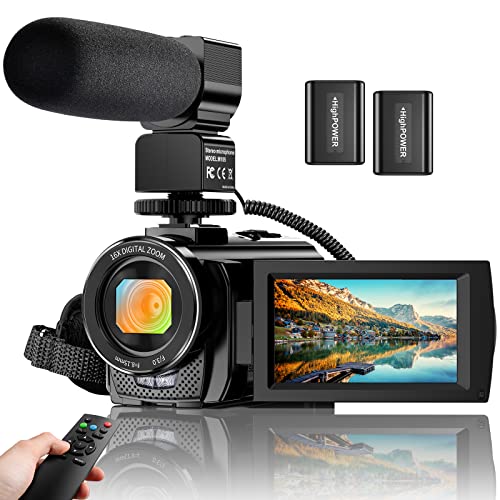
Video Camera Camcorder Digital YouTube Vlogging Camera Recorder FHD 1080P 24.0MP 3.0 Inch 270 Degree Rotation Screen 16X Digital Zoom Camcorder with Microphone,Remote Control and 2 Batteries
Test video – Video Camera Camcorder Digital YouTube Vlogging Camera :
Product highlights :
Video Camera Camcorder: With 8 mega pixel CMOS image sensor it records 30fps movies in 1080p and 60fps in 720p resolution. You can capture vibrant and extremely realistic images; Ideal gift for amateurs and beginners to take selfies and start filming.
Camcorder with Microphone and Remote: This camcorder has built-in and external microphone. The external microphone enhances sound recording volume and reduces noise. It comes with a remote control,no one will miss any precious moment(Within 10 meters).?
Multifunctional Camcorder: The camcorder supports face detect, smile capture, anti shake, data stamp, playback modes, TV output, and pause function etc. With the pause function, you can pause the video when you need to convert the scene without reopening a new file, which makes it easier for you to upload and edit your videos.
Webcam Video Camera: You can use this function for video chatting or live streaming. By connecting the computer with a USB cable, then choose the ¡°PC CAM¡± mode as a webcam.( Please download the software ¡°AMCAP¡± before using the ¡°PC CAM¡± function, and enter the video interface, then you can video chat with your friends.)
Recording While Charging: The video camera comes with 2 3.7V 1500mAh batteries, and it supports recording while charging. If you have any question or suggestion,please feel free to contact us.
Questions & Answers – Video Camera Camcorder Digital YouTube Vlogging Camera :
➕ What is the price of Video Camera Camcorder Digital YouTube Vlogging Camera in Saudi Arabia ?
The price of Video Camera Camcorder Digital YouTube Vlogging Camera in-store is 350 SAR VAT.
➕ When Video Camera Camcorder Digital YouTube Vlogging Camera was released ?
The release date was .
➕ What is the price of Video Camera Camcorder Digital YouTube Vlogging Camera cheap used ?
The price of Video Camera Camcorder Digital YouTube Vlogging Camera used is 240 SAR VAT.
➕ What are the main characteristics of Video Camera Camcorder Digital YouTube Vlogging Camera ?
Special specifications :
Video Camera Camcorder: With 8 mega pixel CMOS image sensor it records 30fps movies in 1080p and 60fps in 720p resolution. You can capture vibrant and extremely realistic images; Ideal gift for amateurs and beginners to take selfies and start filming.
Camcorder with Microphone and Remote: This camcorder has built-in and external microphone. The external microphone enhances sound recording volume and reduces noise. It comes with a remote control,no one will miss any precious moment(Within 10 meters).?
➕ Is it interesting to buy this product ?
The best people who can answer you are customers who have already bought and tested this product (See Customer Reviews). This product is rated 3.9 / 5 on Amazon.
➕ Where to buy Video Camera Camcorder Digital YouTube Vlogging Camera in Saudi Arabia ?
Technical specifications – Video Camera Camcorder Digital YouTube Vlogging Camera :
Brand
ALSONE
Connectivity Technology
USB
Flash Memory Type
SD
Color
Black
Special Feature
,
Screen Size
3 Inches
Optical Zoom
1 x
Photo Sensor Technology
CMOS
Camcorder type
Video Camera
Video Capture Resolution
1080p, 720p
Purchase advice :
Warranty :
Check the duration of the warranty and also the faults and defects it covers. Is it complete or limited? and What is included in the warranty (parts, repairs or both)?
Shipping :
Is delivery offered? And how long does it take to get delivered (Delivery time)
Proof of purchase :
Does the shop give you an invoice ?
After-sales service :
Do they have an after-sales service to have information about the installation or operation (instructions for use). Also in case of problem, it is the seller who takes charge or you must contact the manufacturer or supplier yourself.
_____________________________
16 reviews for Video Camera Camcorder Digital YouTube Vlogging Camera
Rated 5 out of 5
A. K (verified owner)–
I lose this video, camera in one. Clear sounds w/o mic – Over it will definitely buy again
Rated 3 out of 5
B. Z (verified owner)–
Not bad for the money – This is a review for Video Camera Camcorder Digital YouTube Vlogging Camera Recorder FHD 1080P 24.0MP 3.0 Inch 270 Degree Rotation Screen 16X Digital Zoom Camcorder with Microphone,Remote Control and 2 Batteries from Alsone
Rated 5 out of 5
I. P (verified owner)–
Camcorder – A Christmas gift
Rated 3 out of 5
B. Z (verified owner)–
Not bad for the money – This is a review for Video Camera Camcorder Digital YouTube Vlogging Camera Recorder FHD 1080P 24.0MP 3.0 Inch 270 Degree Rotation Screen 16X Digital Zoom Camcorder with Microphone,Remote Control and 2 Batteries from Alsone
Rated 5 out of 5
A. K (verified owner)–
I lose this video, camera in one. Clear sounds w/o mic – Over it will definitely buy again
Rated 5 out of 5
K. A (verified owner)–
Camera – Take pictures great of the grandkids and scenery
Rated 4 out of 5
K. H (verified owner)–
Win 10 Driver Device Detect / USB HUB Caused no detect. – This started with a sinking feeling especially reading reviews. First Mistake – I connected the Camera to a USB HUB that would not allow win10 to detect the camera from the get go. I did add an SD card for testing. I could access Media Storage DCIM but the PC would not recognize the Camera. Then went straight into a USB port on the PC turned on the camera – then usb cable and PC Camera. The PC recognized the J455 camera and installed the driver. AMcap is not needed – the CAMERA App in win10 works just fine. You cannot change Zoom Setting when using PC Camera – I am using a separate DARK WEB brand desk mic. The plan is to record an hour long event and I believe it will work OK. The User Guide is vague but and the Android app has issues about no internet connection (on wifi) – So not great and maybe better price elsewhere but I wanted faster delivery – So, it is a keeper – good but not great…a reasonable value. For folks wanting to use the microphone on the camera – here is one possible solution – Use the line in on your PC Sound Card or (my laptop does not have a Mic In jack) buy a $10 USB to MIC/Headset Adaptor – The mic on the Camera compares very well to the Dark Web Desk Mic.
Rated 4 out of 5
A. G (verified owner)–
Needs improvement but it’s workable – It’s nice for what it is. You get 2 batters but no charger for it but the company has the audacity to send the cord for the charger. Simple to use. I like the microphone and the case .
Rated 5 out of 5
K. A (verified owner)–
Camera – Take pictures great of the grandkids and scenery
Rated 5 out of 5
I. P (verified owner)–
Camcorder – A Christmas gift
Rated 3 out of 5
L. O (verified owner)–
Good at first then started malfunctioning – This was a great camera when I first got it, then it started having issues.
Rated 3 out of 5
A. N (verified owner)–
Video good but music not matched up to video – Music not with video. Very disappointed. Could not get video off camera
Rated 3 out of 5
L. O (verified owner)–
Good at first then started malfunctioning – This was a great camera when I first got it, then it started having issues.
Rated 4 out of 5
A. G (verified owner)–
Needs improvement but it’s workable – It’s nice for what it is. You get 2 batters but no charger for it but the company has the audacity to send the cord for the charger. Simple to use. I like the microphone and the case .
Rated 3 out of 5
A. N (verified owner)–
Video good but music not matched up to video – Music not with video. Very disappointed. Could not get video off camera
Rated 4 out of 5
K. H (verified owner)–
Win 10 Driver Device Detect / USB HUB Caused no detect. – This started with a sinking feeling especially reading reviews. First Mistake – I connected the Camera to a USB HUB that would not allow win10 to detect the camera from the get go. I did add an SD card for testing. I could access Media Storage DCIM but the PC would not recognize the Camera. Then went straight into a USB port on the PC turned on the camera – then usb cable and PC Camera. The PC recognized the J455 camera and installed the driver. AMcap is not needed – the CAMERA App in win10 works just fine. You cannot change Zoom Setting when using PC Camera – I am using a separate DARK WEB brand desk mic. The plan is to record an hour long event and I believe it will work OK. The User Guide is vague but and the Android app has issues about no internet connection (on wifi) – So not great and maybe better price elsewhere but I wanted faster delivery – So, it is a keeper – good but not great…a reasonable value. For folks wanting to use the microphone on the camera – here is one possible solution – Use the line in on your PC Sound Card or (my laptop does not have a Mic In jack) buy a $10 USB to MIC/Headset Adaptor – The mic on the Camera compares very well to the Dark Web Desk Mic.

A. K (verified owner) –
I lose this video, camera in one. Clear sounds w/o mic – Over it will definitely buy again
B. Z (verified owner) –
Not bad for the money – This is a review for Video Camera Camcorder Digital YouTube Vlogging Camera Recorder FHD 1080P 24.0MP 3.0 Inch 270 Degree Rotation Screen 16X Digital Zoom Camcorder with Microphone,Remote Control and 2 Batteries from Alsone
I. P (verified owner) –
Camcorder – A Christmas gift
B. Z (verified owner) –
Not bad for the money – This is a review for Video Camera Camcorder Digital YouTube Vlogging Camera Recorder FHD 1080P 24.0MP 3.0 Inch 270 Degree Rotation Screen 16X Digital Zoom Camcorder with Microphone,Remote Control and 2 Batteries from Alsone
A. K (verified owner) –
I lose this video, camera in one. Clear sounds w/o mic – Over it will definitely buy again
K. A (verified owner) –
Camera – Take pictures great of the grandkids and scenery
K. H (verified owner) –
Win 10 Driver Device Detect / USB HUB Caused no detect. – This started with a sinking feeling especially reading reviews. First Mistake – I connected the Camera to a USB HUB that would not allow win10 to detect the camera from the get go. I did add an SD card for testing. I could access Media Storage DCIM but the PC would not recognize the Camera. Then went straight into a USB port on the PC turned on the camera – then usb cable and PC Camera. The PC recognized the J455 camera and installed the driver. AMcap is not needed – the CAMERA App in win10 works just fine. You cannot change Zoom Setting when using PC Camera – I am using a separate DARK WEB brand desk mic. The plan is to record an hour long event and I believe it will work OK. The User Guide is vague but and the Android app has issues about no internet connection (on wifi) – So not great and maybe better price elsewhere but I wanted faster delivery – So, it is a keeper – good but not great…a reasonable value. For folks wanting to use the microphone on the camera – here is one possible solution – Use the line in on your PC Sound Card or (my laptop does not have a Mic In jack) buy a $10 USB to MIC/Headset Adaptor – The mic on the Camera compares very well to the Dark Web Desk Mic.
A. G (verified owner) –
Needs improvement but it’s workable – It’s nice for what it is. You get 2 batters but no charger for it but the company has the audacity to send the cord for the charger. Simple to use. I like the microphone and the case .
K. A (verified owner) –
Camera – Take pictures great of the grandkids and scenery
I. P (verified owner) –
Camcorder – A Christmas gift
L. O (verified owner) –
Good at first then started malfunctioning – This was a great camera when I first got it, then it started having issues.
A. N (verified owner) –
Video good but music not matched up to video – Music not with video. Very disappointed. Could not get video off camera
L. O (verified owner) –
Good at first then started malfunctioning – This was a great camera when I first got it, then it started having issues.
A. G (verified owner) –
Needs improvement but it’s workable – It’s nice for what it is. You get 2 batters but no charger for it but the company has the audacity to send the cord for the charger. Simple to use. I like the microphone and the case .
A. N (verified owner) –
Video good but music not matched up to video – Music not with video. Very disappointed. Could not get video off camera
K. H (verified owner) –
Win 10 Driver Device Detect / USB HUB Caused no detect. – This started with a sinking feeling especially reading reviews. First Mistake – I connected the Camera to a USB HUB that would not allow win10 to detect the camera from the get go. I did add an SD card for testing. I could access Media Storage DCIM but the PC would not recognize the Camera. Then went straight into a USB port on the PC turned on the camera – then usb cable and PC Camera. The PC recognized the J455 camera and installed the driver. AMcap is not needed – the CAMERA App in win10 works just fine. You cannot change Zoom Setting when using PC Camera – I am using a separate DARK WEB brand desk mic. The plan is to record an hour long event and I believe it will work OK. The User Guide is vague but and the Android app has issues about no internet connection (on wifi) – So not great and maybe better price elsewhere but I wanted faster delivery – So, it is a keeper – good but not great…a reasonable value. For folks wanting to use the microphone on the camera – here is one possible solution – Use the line in on your PC Sound Card or (my laptop does not have a Mic In jack) buy a $10 USB to MIC/Headset Adaptor – The mic on the Camera compares very well to the Dark Web Desk Mic.